
Google Ads
Understand how encryption is used to protect web traffic over insecure networks.
The following video explains the fundamentals of web encryption, including the terminology of SSL, TLS, and HTTPS. TLS (Transport Layer Security) is the current standard of encryption technology used to keep data safe in transit.
This is useful for anyone studing for the ISC2 CISSP Certified Information Systems Security Professional certification, or for other cybersecurity certifications such as the ISACA CISM exam.
Through encryption, data sent between the user and the web server is converted into ciphertext, which cannot be understood by anyone except the intended recipient. These basics of encryption are explained further in my introductory guides:
Modern web traffic uses the concept of hybrid encryption. The client (your web browser) and the server first use asymmetric encryption (public-private key pairs) to communicate. The server provides its web certificate, which makes its public key available to the client.
During the TLS handshake, the client generates a symmetric encryption key (a shared key) and shares it securely with the server using the server's public key. Once this shared key is known by both parties, they switch to using symmetric encryption for the rest of the session, as it is significantly faster and requires less processing power. The TLS handshake process is illustrated below.
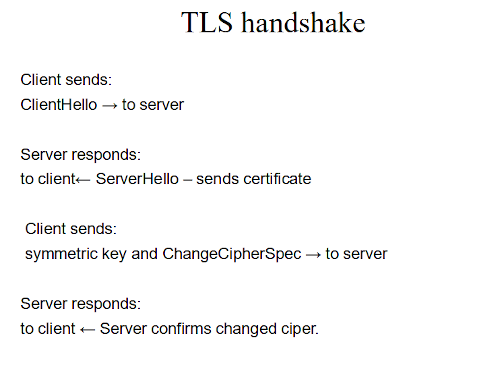
Implementing SSL/TLS provides several critical security advantages:
Just because a website displays a padlock icon in your browser does not mean the website itself is safe. The padlock simply indicates that the connection between you and the server is encrypted. It is still entirely possible for an encrypted, padlock-secured website to host dangerous content, malware, or phishing scams. Diligence is always required.
Web certificates generally fall into three main validation categories. The higher the level of vetting, the more confidence you can have in the identity of the website owner.
| Certificate Type | Validation Level | Description |
|---|---|---|
| Domain Validated (DV) | Low | Validated solely based on proof of domain name ownership. Quick to issue. |
| Organization Validated (OV) | Medium | The Certificate Authority (CA) verifies the organization's name and basic registry details. |
| Extended Validation (EV) | High | Extensive background checks, including verifying the legal, physical, and operational existence of the entity. |
For more detailed information about cryptography, encryption, and network analysis, check out the following guides:


